shapes.Shape
- class rewalt.shapes.Shape
Bases:
OgPosetInductive subclass of
ogposets.OgPosetfor shapes of cells and diagrams.Properly formed objects of the class are unique encodings of the regular molecules from the theory of diagrammatic sets (plus the empty shape, which is not considered a regular molecule).
To create shapes, we start from basic constructors such as
empty(),point(), or one of the named shape constructors, such asglobe(),simplex(),cube().Then we generate new shapes by gluing basic shapes together with
paste(),to_inputs(),to_outputs(), or by producing new higher-dimensional shapes with operations such asatom(),gray(),join().When possible, the constructors place the shapes in appropriate subclasses of separate interest, which include the globes, the oriented simplices, the oriented cubes, and the positive opetopes. This is to enable the specification of special methods for subclasses of shapes.
The following diagram summarises the hierarchy of subclasses of shapes:
 Simplex  Cube  OpetopeTree  Theta
 |    |\  |\     |      |      |
 |    | \ | \ Opetope  GlobeString
 |    |  \|  \   |    /
 |    |   \   \  Globe
 |    |   |\   \/    |
Empty |   | \  /\    |
      |   |  \/  \   |
      |   |  /\   \  |
      |   | /  \   \ |
      |   |/    \   \|
      Point      Arrow
Currently only the
CubeandSimplexclasses have special methods implemented.Methods
Returns an iterator on all layerings of a shape of dimension
ninto shapes with a singlen-dimensional element, pasted along their(n-1)-dimensional boundary.arrow()Constructs the arrow, the unique 1-dimensional atomic shape.
atom(fst, snd, **params)Given two shapes with identical round boundaries, returns a new atomic shape whose input boundary is the first one and output boundary the second one.
atom_inclusion(element)Returns the inclusion of the closure of an element, which is an atomic shape, in the shape.
boundary([sign, dim])Returns the inclusion of the boundary of a given orientation and dimension into the shape.
cube([dim])Constructs the oriented cube of a given dimension.
draw(**params)Bound version of
strdiags.draw().draw_boundaries(**params)Bound version of
strdiags.draw_boundaries().dual(shape, *dims, **params)Returns the shape with orientations reversed in given dimensions.
empty()Constructs the initial, empty shape.
Assigns a layering to the shape, iterating through all the layerings, and returns it.
globe([dim])Constructs the globe of a given dimension.
gray(*shapes)Returns the Gray product of any number of shapes.
id()Returns the identity map on the shape.
inflate([collapsed])Given a closed subset of the boundary of the shape, forms a cylinder on the shape, with the sides incident to the closed subset collapsed, and returns its projection map onto the original shape.
initial()Returns the unique map from the initial, empty shape.
join(*shapes)Returns the join of any number of shapes.
merge()Returns the unique atomic shape with the same boundary, if the shape is round.
paste(fst, snd[, dim])Given two shapes and
ksuch that the outputk-boundary of the first is equal to the inputk-boundary of the second, returns their pasting along the matching boundaries.paste_along(fst, snd, **params)Given a span of shape maps, where one is the inclusion of the input (resp output)
k-boundary of a shape, and the other the inclusion of a round subshape of the output (resp input)k-boundary of another shape, returns the pasting (pushout) of the two shapes along the span.point()Constructs the terminal shape, consisting of a single point.
simplex([dim])Constructs the oriented simplex of a given dimension.
suspend(shape[, n])Returns the n-fold suspension of a shape.
terminal()Returns the unique map to the point, the terminal shape.
theta(*thetas)Inductive constructor for the objects of the Theta category, sometimes known as Batanin cells.
to_inputs(positions, other[, dim])Returns the pasting of another shape along a round subshape of the input
k-boundary, specified by the positions of itsk-dimensional elements.to_outputs(positions, other[, dim])Returns the pasting of another shape along a round subshape of the output
k-boundary, specified by the positions of itsk-dimensional elements.Attributes
Returns whether the shape is an atom (has a greatest element).
Shorthand for
all().isround.Returns the current layering of the shape.
Returns the sequence of rewrite steps associated to the current layering of the shape.
- property isatom
Returns whether the shape is an atom (has a greatest element).
- Returns
isatom –
Trueif and only if the shape has a greatest element.- Return type
bool
Examples
>>> arrow = Shape.arrow()
>>> assert arrow.isatom
>>> assert not arrow.paste(arrow).isatom
- property isround
Shorthand for
all().isround.
- property layers
Returns the current layering of the shape.
- Returns
layers – The current layering.
- Return type
list[ShapeMap]
Examples
>>> arrow = Shape.arrow()
>>> globe = Shape.globe(2)
>>> cospan = globe.paste(arrow).paste(
...         arrow.paste(globe), cospan=True)
>>> shape = cospan.target
>>> assert shape.layers == [cospan.fst, cospan.snd]
- property rewrite_steps
Returns the sequence of rewrite steps associated to the current layering of the shape.
The
0-th rewrite step is the input boundary of the shape. Forn > 0, then-th rewrite step is the output boundary of the(n-1)-th layer.- Returns
rewrite_steps – The current sequence of rewrite steps.
- Return type
list[ShapeMap]
Examples
>>> arrow = Shape.arrow()
>>> globe = Shape.globe(2)
>>> cospan = globe.paste(arrow).paste(
...         arrow.paste(globe), cospan=True)
>>> shape = cospan.target
>>> assert shape.rewrite_steps == [
...         cospan.fst.input,
...         cospan.fst.output,
...         cospan.snd.output]
- static atom(fst, snd, **params)
Given two shapes with identical round boundaries, returns a new atomic shape whose input boundary is the first one and output boundary the second one.
- Parameters
- Keyword Arguments
cospan (
bool) – Whether to return the cospan of inclusions of the input and output boundaries (default isFalse).- Returns
atom – The new atomic shape (optionally with the cospan of inclusions of its boundaries).
- Return type
Shape|ogposets.OgMapPair- Raises
ValueError – If the boundaries do not match, or are not round.
Examples
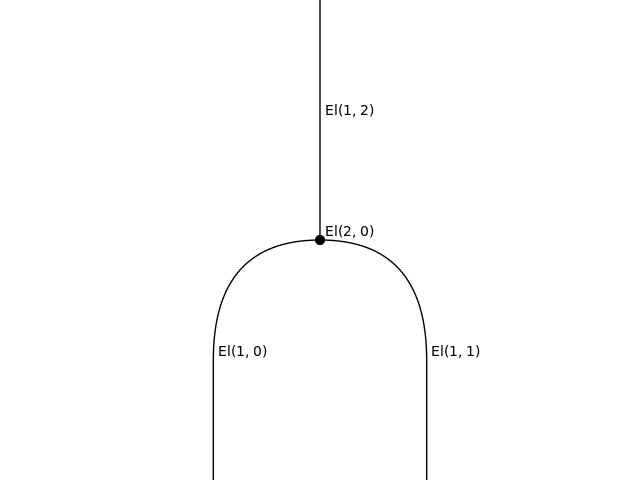
We create a 2-dimensional cell shape with two input 1-cells and one output 2-cell.
>>> arrow = Shape.arrow()
>>> binary = arrow.paste(arrow).atom(arrow)
>>> binary.draw(path='docs/_static/img/Shape_atom.png')
- static paste(fst, snd, dim=None, **params)
Given two shapes and
ksuch that the outputk-boundary of the first is equal to the inputk-boundary of the second, returns their pasting along the matching boundaries.- Parameters
- Keyword Arguments
cospan (
bool) – Whether to return the cospan of inclusions of the two shapes into the pasting (default isFalse).- Returns
paste – The pasted shape (optionally with the cospan of inclusions of its components).
- Return type
Shape|ogposets.OgMapPair- Raises
ValueError – If the boundaries do not match.
Examples
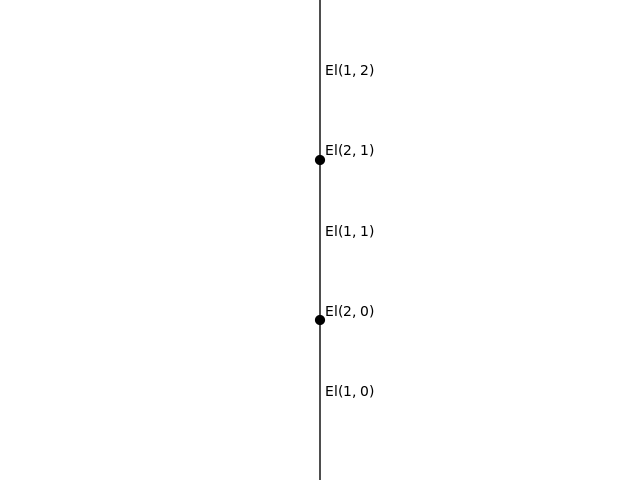
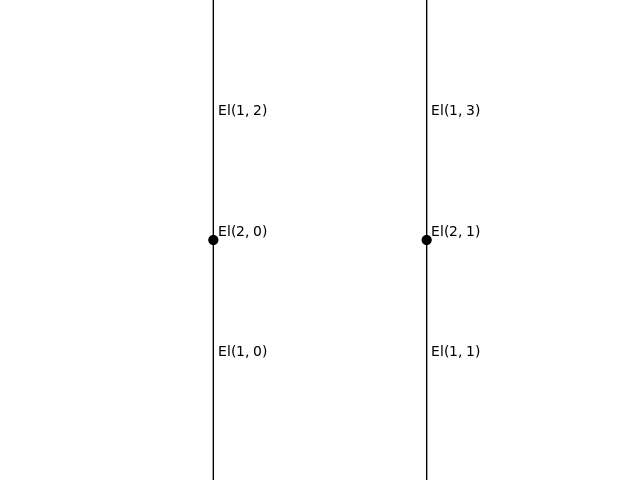
We can paste two 2-dimensional globes either “vertically” along their 1-dimensional boundary or “horizontally” along their 0-dimensional boundary.
>>> globe = Shape.globe(2)
>>> vert = globe.paste(globe)
>>> horiz = globe.paste(globe, 0)
>>> vert.draw(path='docs/_static/img/Shape_paste_vert.png')
>>> horiz.draw(path='docs/_static/img/Shape_paste_horiz.png')
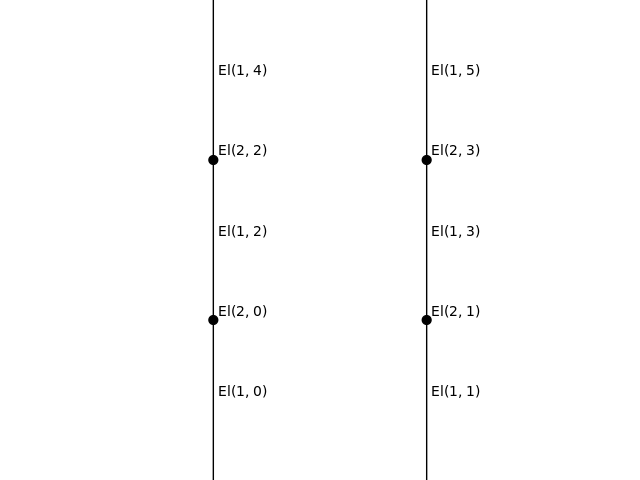
We can also check that the interchange equation holds.
>>> assert vert.paste(vert, 0) == horiz.paste(horiz)
>>> horiz.paste(horiz).draw(
...     path='docs/_static/img/Shape_paste_interchange.png')
- static paste_along(fst, snd, **params)
Given a span of shape maps, where one is the inclusion of the input (resp output)
k-boundary of a shape, and the other the inclusion of a round subshape of the output (resp input)k-boundary of another shape, returns the pasting (pushout) of the two shapes along the span.In practice, it is convenient to use
to_inputs()andto_outputs()instead, where the data of the span is specified bykand the positions of thek-dimensional elements in the round subshape along which the pasting occurs.- Parameters
- Keyword Arguments
wfcheck (
bool) – Check if the span gives rise to a well-formed pasting (default isTrue).cospan (
bool) – Whether to return the cospan of inclusions of the two shapes into the pasting (default isFalse).
- Returns
paste_along – The pasted shape (optionally with the cospan of inclusions of its components).
- Return type
Shape|ogposets.OgMapPair- Raises
ValueError – If the pair of maps is not an injective span.
- to_outputs(positions, other, dim=None, **params)
Returns the pasting of another shape along a round subshape of the output
k-boundary, specified by the positions of itsk-dimensional elements.- Parameters
positions (
list[int]|int) – The positions of the outputs along which to paste. If given an integern, interprets it as the list[n].other (
Shape) – The other shape to paste.dim (
int, optional) – The dimension of the boundary along which to paste (default isself.dim - 1)
- Keyword Arguments
cospan (
bool) – Whether to return the cospan of inclusions of the two shapes into the pasting (default isFalse).- Returns
to_outputs – The pasted shape (optionally with the cospan of inclusions of its components).
- Return type
Shape|ogposets.OgMapPair- Raises
ValueError – If the boundaries do not match, or the pasting does not produce a well-formed shape.
Examples
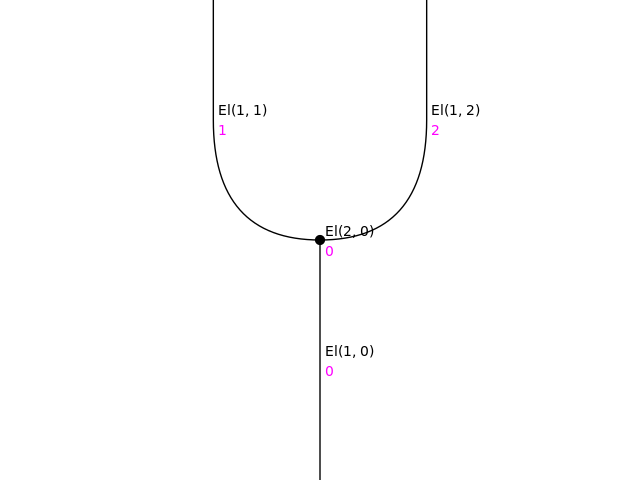
We create a 2-simplex and visualise it as a string diagram with the
positionsparameter enabled.>>> simplex = Shape.simplex(2) >>> simplex.draw( ... positions=True, path='docs/_static/img/Shape_to_outputs1.png')
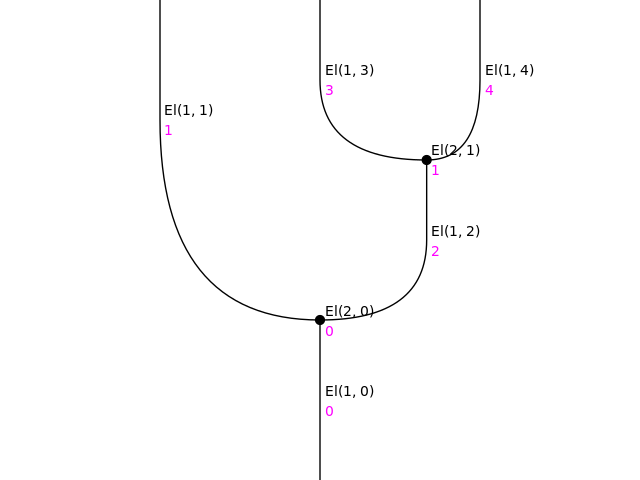
We paste another 2-simplex to the output in position
2.>>> paste1 = simplex.to_outputs(2, simplex) >>> paste1.draw( ... positions=True, path='docs/_static/img/Shape_to_outputs2.png')
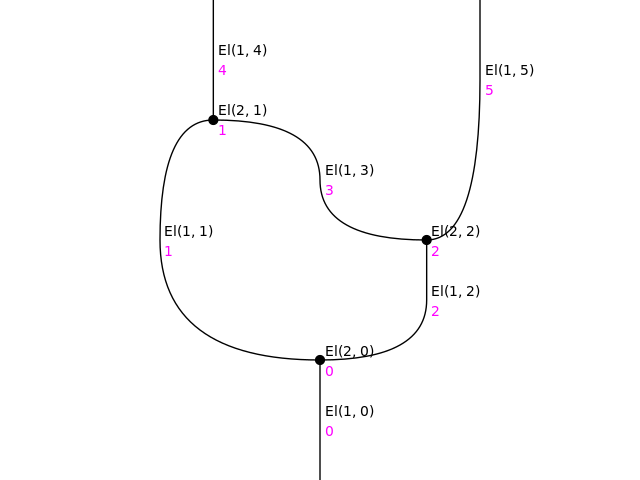
Finally, we paste the dual of a 2-simplex to the outputs in positions
2, 3.>>> paste2 = paste1.to_outputs([1, 3], simplex.dual()) >>> paste2.draw( ... positions=True, path='docs/_static/img/Shape_to_outputs3.png')
- to_inputs(positions, other, dim=None, **params)
Returns the pasting of another shape along a round subshape of the input
k-boundary, specified by the positions of itsk-dimensional elements.- Parameters
positions (
list[int]|int) – The positions of the inputs along which to paste. If given an integern, interprets it as the list[n].other (
Shape) – The other shape to paste.dim (
int, optional) – The dimension of the boundary along which to paste (default isself.dim - 1)
- Keyword Arguments
cospan (
bool) – Whether to return the cospan of inclusions of the two shapes into the pasting (default isFalse).- Returns
to_inputs – The pasted shape (optionally with the cospan of inclusions of its components).
- Return type
Shape|ogposets.OgMapPair- Raises
ValueError – If the boundaries do not match, or the pasting does not produce a well-formed shape.
Examples
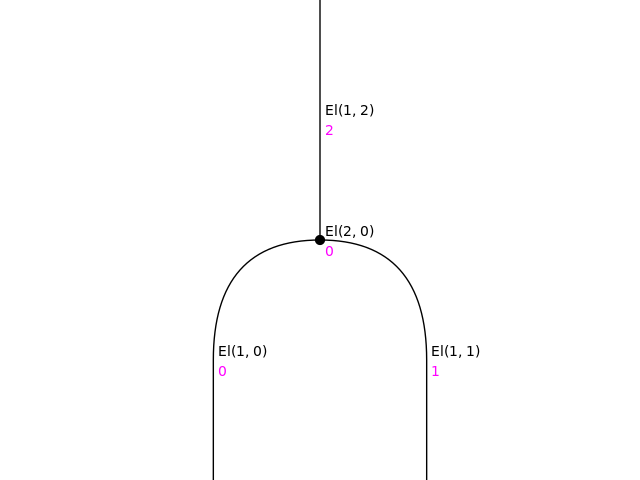
We work dually to the example for
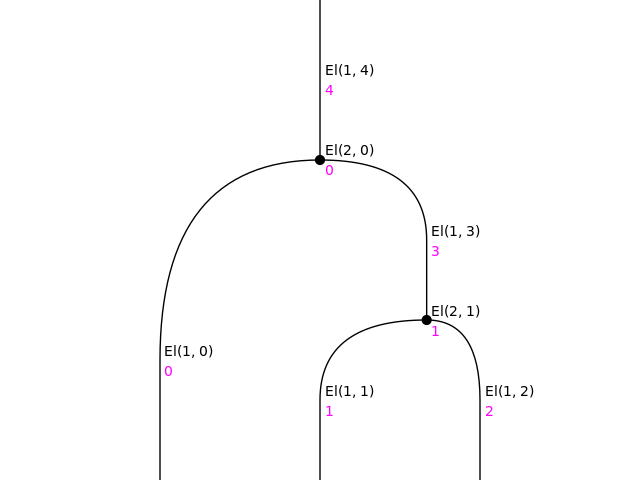
to_outputs().>>> binary = Shape.simplex(2).dual() >>> binary.draw( ... positions=True, path='docs/_static/img/Shape_to_inputs1.png')
>>> paste1 = binary.to_inputs(1, binary)
>>> paste1.draw(
...     positions=True, path='docs/_static/img/Shape_to_inputs2.png')
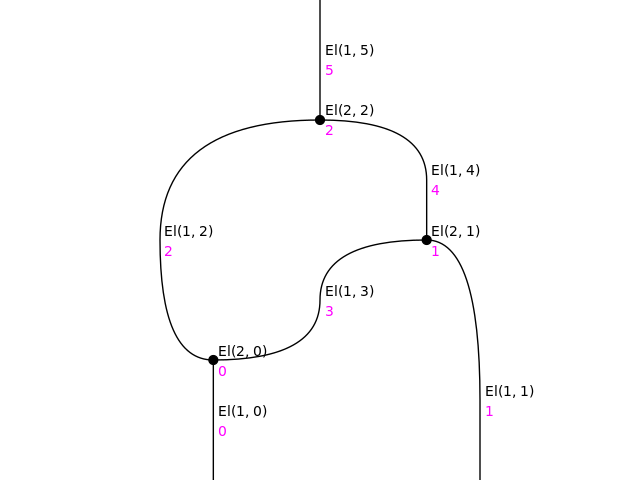
>>> paste2 = paste1.to_inputs([0, 1], binary.dual())
>>> paste2.draw(
...     positions=True, path='docs/_static/img/Shape_to_inputs3.png')
- static suspend(shape, n=1)
Returns the n-fold suspension of a shape.
This static method can be also used as a bound method after an object is initialised, that is,
shape.suspend(n)is equivalent tosuspend(shape, n).- Parameters
shape (
Shape) – The object to suspend.n (
int, optional) – The number of iterations of the suspension (default is 1).
- Returns
suspension – The suspended shape.
- Return type
Examples
The suspension of the point is the arrow, and the suspension of an arrow is the 2-globe.
>>> assert Shape.point().suspend() == Shape.arrow()
>>> assert Shape.arrow().suspend() == Shape.globe(2)
In general, the suspension of the n-globe is the (n+1)-globe.
- static gray(*shapes)
Returns the Gray product of any number of shapes.
This method can be called with the math operator
*, that is,fst * sndis equivalent togray(fst, snd).This static method can also be used as a bound method after an object is initialised, that is,
fst.gray(*shapes)is equivalent togray(fst, *shapes).- Parameters
*shapes (
Shape) – Any number of shapes.- Returns
gray – The Gray product of the arguments.
- Return type
Example
The point is a unit for the Gray product.
>>> point = Shape.point()
>>> arrow = Shape.arrow()
>>> assert point*arrow == arrow*point == arrow
The Gray product of two arrows is the oriented square (2-cube).
>>> arrow = Shape.arrow()
>>> assert arrow*arrow == Shape.cube(2)
In general, the Gray product of the n-cube with the k-cube is the (n+k)-cube.
- static join(*shapes)
Returns the join of any number of shapes.
This method can be called with the shift operators
>>and<<, that is,fst >> sndis equivalent tojoin(fst, snd)andfst << sndis equivalent tojoin(snd, fst).This static method can also be used as a bound method after an object is initialised, that is,
fst.join(*shapes)is equivalent tojoin(fst, *shapes).- Parameters
*shapes (
Shape) – Any number of shapes.- Returns
join – The join of the arguments.
- Return type
Examples
The empty shape is a unit for the join.
>>> empty = Shape.empty()
>>> point = Shape.point()
>>> assert empty >> point == point >> empty == point
The join of two points is the arrow, and the join of an arrow and a point is the 2-simplex.
>>> arrow = Shape.arrow()
>>> assert point >> point == Shape.arrow()
>>> assert arrow >> point == Shape.simplex(2)
In general, the join of an n-simplex with a k-simplex is the (n+k+1)-simplex.
- static dual(shape, *dims, **params)
Returns the shape with orientations reversed in given dimensions.
The dual in all dimensions can also be called with the bit negation operator
~, that is,~shapeis equivalent toshape.dual().This static method can be also used as a bound method after an object is initialised, that is,
shape.dual(*dims)is equivalent todual(shape, *dims).- Parameters
shape (
Shape) – A shape.*dims (
int) – Any number of dimensions; if none, defaults to all dimensions.
- Returns
dual – The shape, dualised in the given dimensions.
- Return type
Examples
>>> arrow = Shape.arrow()
>>> simplex = Shape.simplex(2)
>>> binary = arrow.paste(arrow).atom(arrow)
>>> assert binary == simplex.dual()
>>> assoc_l = binary.to_inputs(0, binary)
>>> assoc_r = binary.to_inputs(1, binary)
>>> assert assoc_r == assoc_l.dual(1)
- merge()
Returns the unique atomic shape with the same boundary, if the shape is round.
- Returns
merge – The unique atomic shape with the same boundary.
- Return type
- Raises
ValueError – If the shape is not round.
Examples
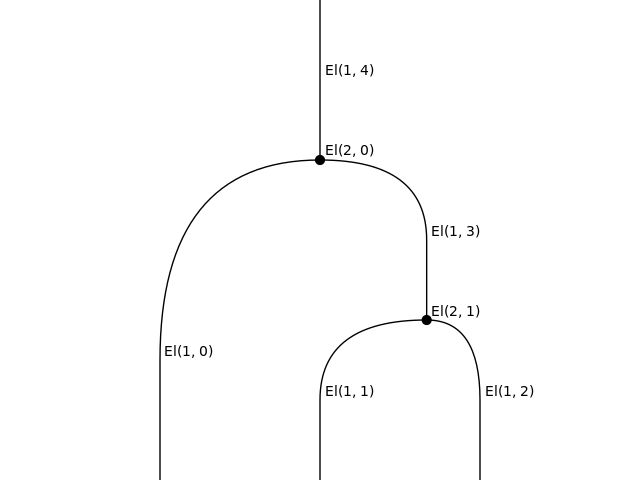
We create a 2-dimensional shape with two input 1-cells and one output 1-cell, and paste it to itself along one of the inputs.
>>> arrow = Shape.arrow()
>>> binary = arrow.paste(arrow).atom(arrow)
>>> to_merge = binary.to_inputs(1, binary)
>>> to_merge.draw(path='docs/_static/img/Shape_merge1.png')
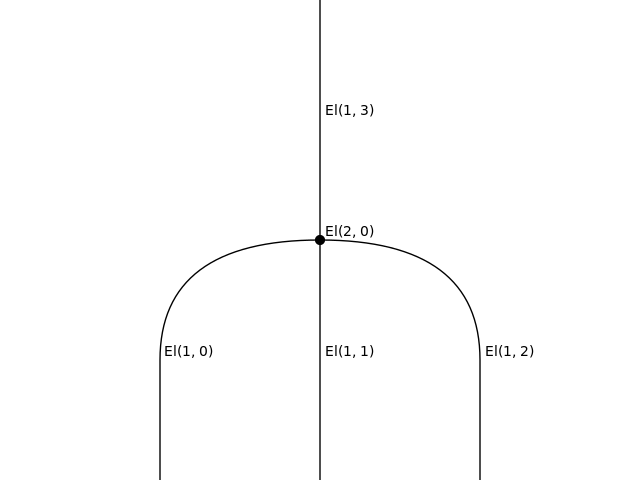
The “merged” shape is the 2-dimensional atom with three input 2-cells and one output 1-cell.
>>> merged = to_merge.merge()
>>> merged.draw(path='docs/_static/img/Shape_merge2.png')
- static empty()
Constructs the initial, empty shape.
- Returns
empty – The empty shape.
- Return type
Empty
- static point()
Constructs the terminal shape, consisting of a single point.
- Returns
point – The point.
- Return type
Point
- static arrow()
Constructs the arrow, the unique 1-dimensional atomic shape.
- Returns
arrow – The arrow.
- Return type
Arrow
- static simplex(dim=- 1)
Constructs the oriented simplex of a given dimension.
- Parameters
dim (
int) – The dimension of the simplex (default is-1).- Returns
simplex – The simplex of the requested dimension.
- Return type
- static cube(dim=0)
Constructs the oriented cube of a given dimension.
- Parameters
dim (
int) – The dimension of the cube (default is0).- Returns
cube – The cube of the requested dimension.
- Return type
- static globe(dim=0)
Constructs the globe of a given dimension.
- Parameters
dim (
int) – The dimension of the globe (default is0).- Returns
globe – The globe of the requested dimension.
- Return type
Globe
- static theta(*thetas)
Inductive constructor for the objects of the Theta category, sometimes known as Batanin cells.
Batanin cells are in 1-to-1 correspondence with finite plane trees. The constructor is based on this correspondence, using the well-known inductive definition of plane trees: given any number
kof Batanin cells, it returns the Batanin cell encoded by a root withkchildren, to which thekplane trees encoding the arguments are attached.- Parameters
thetas (
Theta) – Any number of Batanin cells.- Returns
theta – The resulting Batanin cell.
- Return type
Theta
Examples
Every globe is a Batanin cell, encoded by the linear tree of length equal to its dimension.
>>> assert Shape.theta() == Shape.globe(0)
>>> assert Shape.theta(Shape.theta()) == Shape.globe(1)
>>> assert Shape.theta(Shape.theta(Shape.theta())) == Shape.globe(2)
The tree with one root with n children corresponds to a string of n arrows.
>>> point = Shape.theta()
>>> arrow = Shape.arrow()
>>> assert Shape.theta(point, point) == arrow.paste(arrow)
- id()
Returns the identity map on the shape.
- Returns
id – The identity map on the object.
- Return type
- boundary(sign=None, dim=None)
Returns the inclusion of the boundary of a given orientation and dimension into the shape.
Note that input and output boundaries of shapes are shapes, so they are returned as shape maps; however, the entire (input + output) boundary of a shape is not a shape, so it is returned simply as a map of oriented graded posets.
- Parameters
sign (
str, optional) – Orientation:'-'for input,'+'for output,None(default) for both.dim (
int, optional) – Dimension of the boundary (default isself.dim - 1).
- Returns
boundary – The inclusion of the requested boundary into the object.
- Return type
ShapeMap|OgMap
Examples
>>> point = Shape.point()
>>> arrow = Shape.arrow()
>>> binary = arrow.paste(arrow).atom(arrow)
>>> assert binary.boundary('-').source == arrow.paste(arrow)
>>> assert binary.boundary('+').source == arrow
>>> assert binary.boundary('-', 0).source == point
>>> assert binary.boundary('-').target == binary
- atom_inclusion(element)
Returns the inclusion of the closure of an element, which is an atomic shape, in the shape.
- Parameters
element (
El) – An element of the shape.- Returns
atom_inclusion – The inclusion of the closure of the element.
- Return type
Examples
>>> arrow = Shape.arrow()
>>> globe = Shape.globe(2)
>>> whisker_l = arrow.paste(globe)
>>> assert whisker_l.atom_inclusion(El(2, 0)).source == globe
- initial()
Returns the unique map from the initial, empty shape.
- Returns
initial – The unique map from the empty shape.
- Return type
Examples
>>> point = Shape.point()
>>> empty = Shape.empty()
>>> assert point.initial() == empty.terminal()
>>> assert empty.initial() == empty.id()
- terminal()
Returns the unique map to the point, the terminal shape.
- Returns
terminal – The unique map to the point.
- Return type
Examples
>>> point = Shape.point()
>>> assert point.terminal() == point.id()
- inflate(collapsed=None)
Given a closed subset of the boundary of the shape, forms a cylinder on the shape, with the sides incident to the closed subset collapsed, and returns its projection map onto the original shape.
This is mainly used in constructing units and unitors on diagrams; see
diagrams.Diagram.unit(),diagrams.Diagram.lunitor(),diagrams.Diagram.runitor().- Parameters
collapsed (
Closed, optional) – A closed subset of the boundary of the shape (default is the entire boundary).- Returns
inflate – The projection map of the “partially collapsed cylinder” onto the shape.
- Return type
Closed- Raises
ValueError – If collapsed is not a subset of the boundary.
- all_layerings()
Returns an iterator on all layerings of a shape of dimension
ninto shapes with a singlen-dimensional element, pasted along their(n-1)-dimensional boundary.- Returns
all_layerings – The iterator on all layerings of the shape.
- Return type
Iterable
- generate_layering()
Assigns a layering to the shape, iterating through all the layerings, and returns it.
- Returns
layers – The generated layering.
- Return type
list[ShapeMap]
Examples
>>> arrow = Shape.arrow()
>>> globe = Shape.globe(2)
>>> chain = globe.paste(globe, 0)
>>> chain.generate_layering()
>>> assert chain.layers[0].source == arrow.paste(globe)
>>> assert chain.layers[1].source == globe.paste(arrow)
>>> chain.generate_layering()
>>> assert chain.layers[0].source == globe.paste(arrow)
>>> assert chain.layers[1].source == arrow.paste(globe)
- draw(**params)
Bound version of
strdiags.draw().Calling
x.draw(**params)is equivalent to callingstrdiags.draw(x, **params).
- draw_boundaries(**params)
Bound version of
strdiags.draw_boundaries().Calling
x.draw_boundaries(**params)is equivalent to callingstrdiags.draw_boundaries(x, **params).